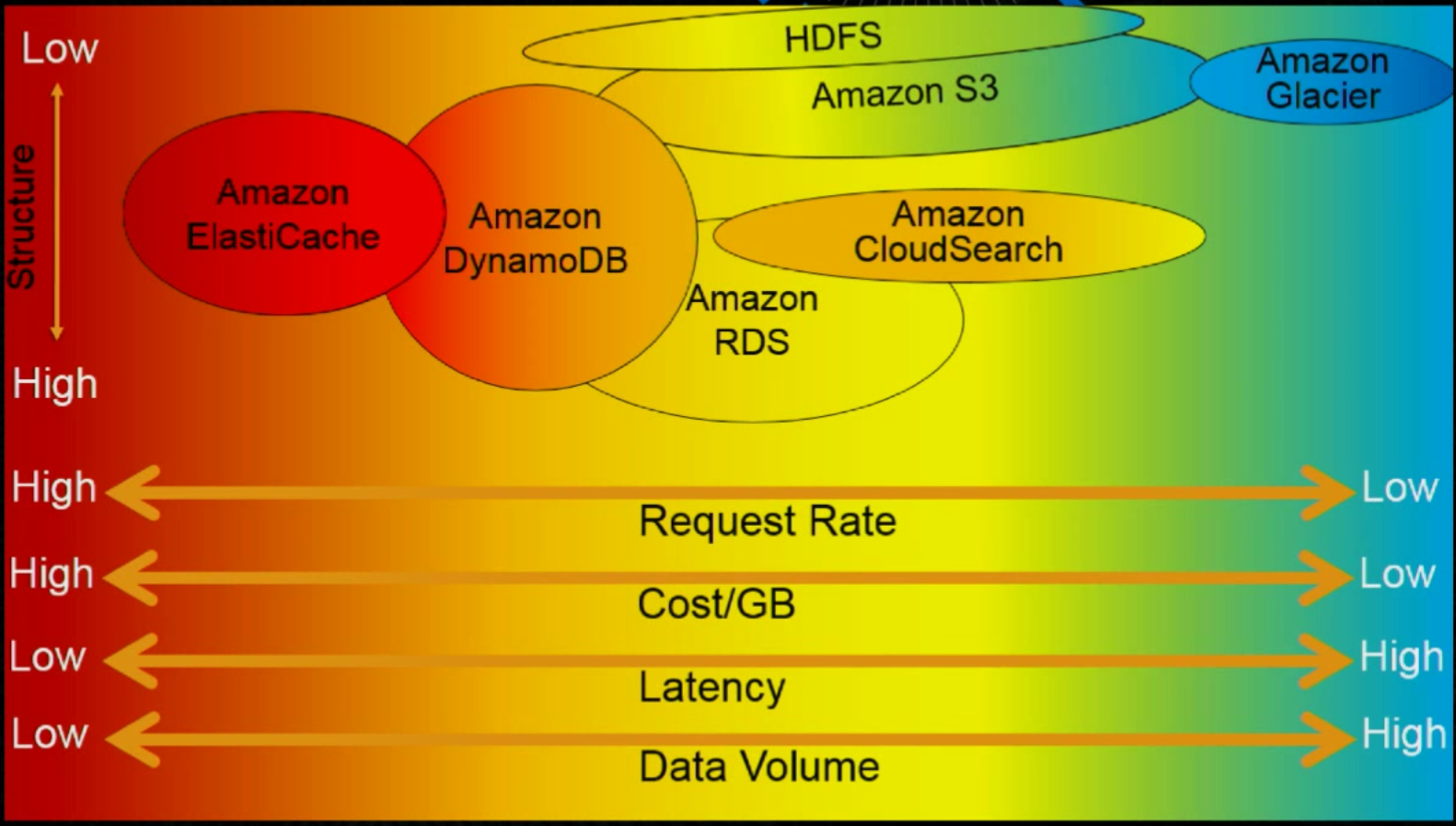
Fast (快)
Managed (好)
Scalable (好)
Durable and Highly Available (好)
Flexible (好)
Low cost (便宜)
核心元件 (Core Components)
經常會跟 MongoDB 比較,概念很類似:
Tables:
類似於 RDBMS 的 Table.
DynamoDB Table 是一個儲存集合單位。
相當於 MongoDB 的 Collection
Items:
每個 Table 可以有多個 Items,相當於 RDBMS 的 Rows。
每個 Items 可包含多個 Attributes
相當於 MongoDB 的 Document
Attributes:
每個 Items 由一個或多個 Attributes 組成
Attribute 的資料型態有
建立 Attribute 時,注意保留字:Reserved Words
Primary Key
DynamoDB 支援兩種 Primary Keys:
Partition key:
又叫 hash attribute ,指定某一個 attribute 當作 primary key (unique key),稱作 partition key,類似於 RDBMS 的 Unique Key.
DynamoDB 利用這個值透過內部的 hash function,然後依據 hash 過的值,決定資料要放在哪個實體的儲存體 (Storage)。這概念類似於 Sharding (分片) 的想法。
基本上,不會有重複的 hash value,也就是不會有重複的 partition key。
Partition key and sort key:
使用兩個 attribute 的複合鍵 (composite key): partition key + sort key, 或者稱為 hash key + range key
sort key 又叫 range attribute 如果 sort key 存在,那麼 partition key 可以重複
hash key + range key 必須是唯一最常用的例子就是 unique key + date range 這樣的組合。
Secondary Indexes
一個 Table 除了 Primary Key,可以有一個或多個 Secondary Indexes,每個 Table 最多各五個 GSI 跟 LSI:
Global Secondary Indexes (GSI): 有自己的 Partition 和 RCU / WCULocal Secondary Indexes (LSI): 與 Table 共用 Partition 的 RCU / WCU
Data Type
Scalar Types (純量): number, string, binary, Boolean, and null.Document Types: list and map.Set Types: multiple scalar values, 包含 string set, number set, and binary set.
Read Consistency (讀取一致性模型)
DynamoDB 設計在每個 Region AZ 都可以快速的 Replica 資料,通常會在 1s 以內或更少。DynamoDB 支援兩種一致性模型:
Eventually Consistent Reads (最終一致性, ECR): 每秒可以讀 2 次, 每次 4KB 大小,所以可以讀取最大為 8KiBStrongly Consistent Reads (強制一致性, SCR): 每秒可以讀 1 次, 每次 4KB 大小。
這兩個的差異:ECR 不會反映最近完成的寫入操作結果,而 SCR 則一定會反應最近寫入的結果。
因為 DynamoDB 本身在 AWS Region 裡都是跨 AZ,每個 Table 都會存在各地三個副本 (Reclica)。
透過 API 指定用什麼方式,預設是 Eventually Consistent Reads,以下是 Node.js 的範例:
1
2
3
4
5
6
7
8
var params = { TableName: 'STRING_VALUE' ,
ConsistentRead: true || false ,
};
dynamodb.getItem(params, function (err, data )
if (err) console .log(err, err.stack);
else console .log(data);
});
Global Tables
— 待整理 —
Read/Write Capacity Mode
Provisioned Mode
DynamoDB 每個 Table 都有讀寫能力單元 (Capacity Units) 的設定,稱作 Read Capacity Units (RCU)、Write Capacity Units (WCU).
Read Capacity Units (RCU): 每次讀取單位為 4K
Strongly Consistent Reads 每秒讀一次
Eventually Consistent Reads 每秒讀兩次,也就是每秒 8KB
如果讀寫大小超過 4KB,那麼就會需要額外的 RCU
Write Capacity Units (WCU): 每次寫入單位為 1KB,超過大小就會額外消耗 WCUSecondary Indexes 會另外消耗 Capacity Units,有獨立的 RCU / WCU
RCU / WCU 這兩個值會影響效能,也會依據需求收費。
DynamoDB 讀寫的 API:
Read:
GetItem: 一次取回一個 Item
BatchGetItem: 一次操作最多取回 100 Items
Write:
PutItem / UpdateItem / DeleteItem: 單一個 Item 操作
BatchWriteItem: 一次操作,最多 Put / Delete 25 Items
另外,Provisioned Capacity 可以:
買 Reserved Capacity。
Auto Scaling
On-demand (建議)
On-Demand Mode
以下情境適合使用 On-Demand Mode:
新的 Table,但無法知道需要多少 Read / Write Capacity
有無法預期的請求流量
成本考量,期望用多少,付多少。 (不養機器的概念)
不過這種概念就是把使用的狀況,返回給使用者自行決定,換言之,如果沒有了解 RCU / WCU 的基礎概念,沒有良好的設計,屆時會反映在成本上,而不只是方便維運。
Guidelines for Working with Tables
Partition Behavior of Table
一個 partition 最多提供 3000 RCU / 1000 WCU。建立 Table 時,如果指定 1000 RCU / 500 WCU,那麼需要的 Partition 計算公式如下:
Total partitions for desired performance = (Desired RCU / 3000 RCU) + (Desired WCU / 1000 WCU)
例如:1000 RCU, 500 WCU 需要幾個 Partition?
( 1,000 / 3,000 ) + ( 500 / 1,000 ) = 0.8333 --> 1
所以一個 partition 可以滿足上述的需求。如果 RCU / WCU = 1000,那麼需要的 partition:
( 1,000 / 3,000 ) + ( 1,000 / 1,000 ) = 1.333 --> 2
Partition Split
Partition Split 代表著拆分不同的區塊,儲存資料,每個 Partition 有其基本的讀寫能力與容量。一個 partition 可以儲存 10GiB 的資料,加上 RCU / WCU 的計算,所以以下兩個條件會發生 partition split:
增加 capacity throughput
需要增加 storage 空間
Increased Provisioned Throughput Settings
建立一個 Table ,然後有 5,000 RCU、2,000 WCU,那麼初始的時候就會有 4 個 Partitions,計算公式如下:
( 5000 / 3,000 ) + ( 2,000 / 1,000 ) = 3.6667 --> 4
4 個 partition 將會被配份使用 1,250 RCU (5000/4)、500 WCU (2000/4)。
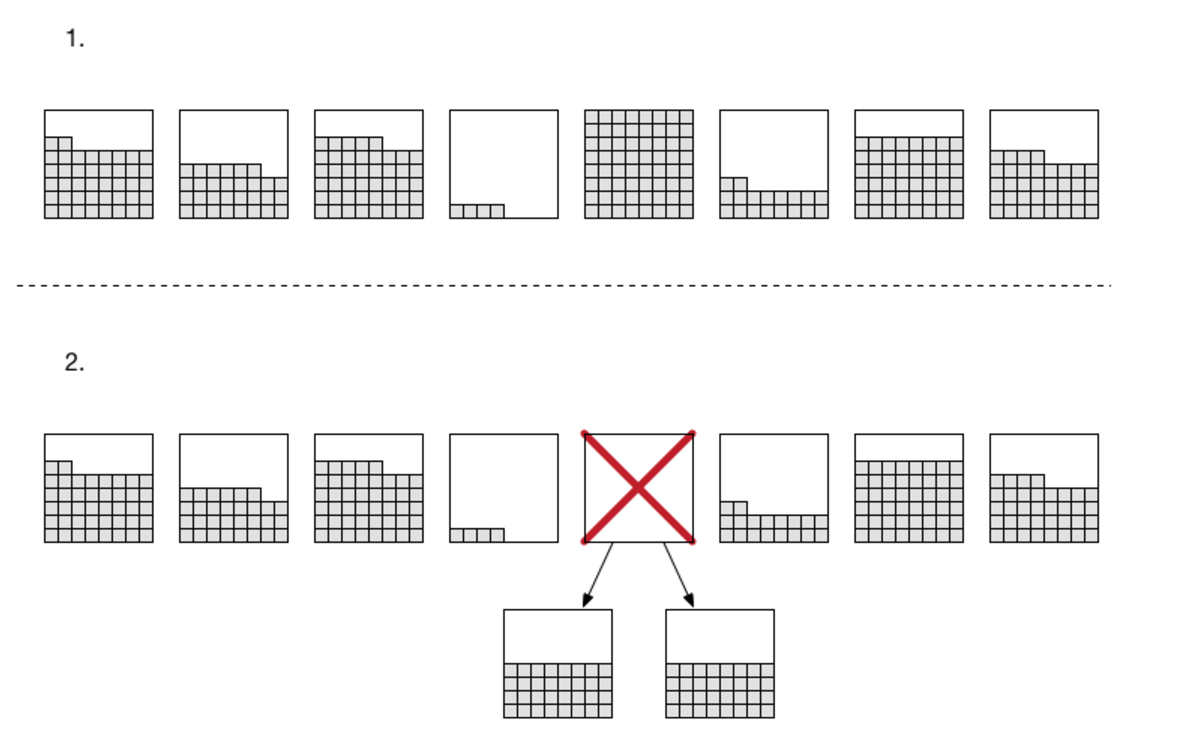
如果使用者把 RCU 調整成 8,000,那麼既有的四個 partition 就無法滿足需求,DynamoDB 會自動加倍 partition,變成 8 partitions。如下圖:
最後再把資料平均分配到新的 partition。而每個 partition 的 RCU / WCU 會變成:
RCU: 8000 / 8 = 1000
WCU: 2000 / 8 = 250
Increased Storage Requirements
當資料量超過一個 partition 大小 10GB 的時候,就會自動長出新的。
上一個例子最後有 8 partitions,如果其中一個超過 10GB
Use Burst Capacity Sparingly
因為每個 partition 都有一定的 RCU / WCU,所以也就變成每個 Table 不管使用者要多少,實際上,都會有 buffer,所以如果有瞬間量的需求 (bursts 爆炸),實際上是可以撐一下的。
DynamoDB 保留了五分鐘的 burst 給 RCU / WCU。在這段時間的 R/W 動作,可以非常快速地被消化,基本上會比定義的還要快。
但是不要把 burst 的 RCU / WCU 當成設計的一部份,因為 DynamoDB 會預先使用這些 Capacity 作維護任務。
未來 burst 可能可以讓使用者自行設定。
Cache Popular Items
AWS 官方建議,如果有一些資料存取比較頻繁,建議使用 In Memory 的方式,像是 ElasticCache,或者 DAX。
Limitation
Capacity Unit Sizes 是固定的值,讀 (RCU) 跟寫 (WCU) 都有預設值。而每個 AWS Account / Per Region 也都有一些上限,使用時要注意這些限制。以下資料整理自
Limits in DynamoDB
Capacity Unit Sizes:
RCU: 強一致性 (strongly consistent) 讀取,每秒 4KBytes、最終一致性 (eventually consistent) 則是 8KBytes 每秒.
WCU: 每秒寫入 1KByte.
Limit by Table and Account, 大部分的 Region 如下:
Per table – 40,000 RCU, 40,000 WCU
Per account – 80,000 RCU, and 80,000 WCU
40,000 RCU = 160MBytes, or 320MBytes
Development with DynamoDB
local development using docker
DynamoDB 本身都是透過 Web Service 存取,所以沒有 RDBMS Connection 的概念,所以也不會有 Connection Pool 的問題。
2018 年開始提供了 docker image
docker run -p 8000:8000 amazon/dynamodb-local
AWS 提供 DynamoDB local 版,需要 jre6 以上,使用方式如下:
相關資料:
NoSQL Workbench Preview (updated: 2019/09/17)
Data Modeling
Data Visualization
Operation Building
目前還在 Preview 階段。
使用時機
Design Patterns and Best Practice
AWS 官方整理了很多 DynamoDB 的 Design Patterns,很值得研究,整理如下。
from :
https://rickhw.github.io/2016/08/17/AWS/Study-Notes-DynamoDB/